CoinStats - Crypto Tracker
- 4.5
- Rating
- 1.00M
- Installs
- Free
- Price
 Analysis by App-foxy
If you are new to crypto tracking, CoinStats - Crypto Tracker is the kind of finance app I would try before building a complicated spreadsheet. I found its main appeal in putting prices, charts, portfolio information, and broader crypto statistics in one place without asking me to treat the app like an exchange. That distinction matters: it is primarily a visibility and organization tool, not a shortcut to understanding every market move.
The app is free to install, has an Everyone content rating, and is developed by Coin Stats, Inc . - Crypto Portfolio Tracker App. It has grown into a widely used option, with over a million installs and a 4.5 average from around 105 thousand ratings. Those figures do not make it automatically right for everyone, but they do suggest that it has become a familiar starting point for people who want a clearer view of digital assets.
What to expect when you open CoinStats
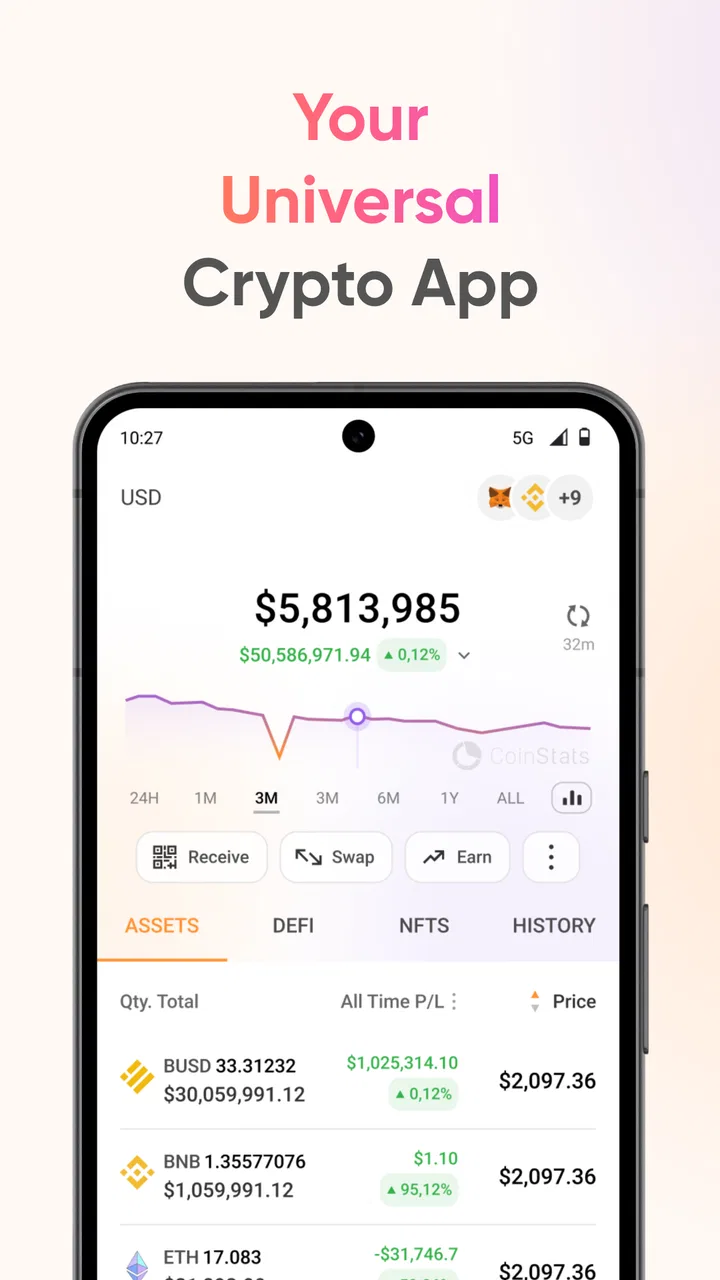
The first thing I noticed is that CoinStats is designed around monitoring rather than constant action. You can use it to check Bitcoin, Ethereum, and other crypto prices, inspect chart movement, and keep an eye on the value of holdings. That makes it useful for someone who owns assets across more than one place and wants a single overview instead of switching between several exchange apps.
You May Also Like

 Blood Strike: 2.5 Anniversary
Blood Strike’s Loadouts Turn Every Drop Into a Tactical Gamble
A close look at Blood Strike’s custom loadouts: how fast access to signature weapons reshapes its battle royale rhythm, rewards preparation, and narrows the gap between fights.

 Pandora - Music & Podcasts
Pandora’s Music Is Easy to Start, but Harder to Recover
Pandora’s strength is its low-effort path from a seed to a station. Its weak spot is how much confidence it asks you to place in connection, setup, and quiet recovery.

 8 Ball Pool
 Is Built on Rivalries, Rematches, and Routine
A close look at the rivalries, rematches, shared routines, and unanswered safety questions that turn a quick pool match into a persistent mobile community.

 Samsung Music
’s Quiet Strength Is Playing What You Already Own
Its reach comes less from spectacle than from dependable access to a personal library. That simplicity is both the app’s strongest retention engine and its ceiling.

 AccuWeather: Weather Radar
AccuWeather Review: A Quick, Clear Forecast for Everyday Decisions
For everyday plans, the best forecast is the one you can understand quickly. AccuWeather makes rain timing, radar, and local conditions easy to act on, with a few trade-offs.

 Hill Climb Racing
Why Hill Climb Racing Still Turns Crashes Into One More Run
A tiny car, a bumpy hill and one more upgrade: Hill Climb Racing keeps resurfacing because its simple chaos makes every near-miss feel personal.
More From Our News Desk



That overview is also the app’s most important limitation. A portfolio tracker can show you what your assets are doing, but it cannot make a volatile market predictable. I would use the numbers to understand my current position, compare movements, and decide when I need a closer look. I would not treat a rising line or a prominent statistic as a recommendation to buy or sell.
The interface is most helpful when you already know the few assets you care about. A beginner who follows Bitcoin and Ethereum can start with a narrow watchlist and avoid drowning in an endless stream of tokens. Someone with a larger portfolio may appreciate the broader crypto statistics, but should still resist adding every interesting coin simply because it appears in the app.
CoinStats runs on Android from version 7.0 onward, so it remains accessible on many older phones. The current version is 5.31.0, and the app’s long availability since April 27, 2018, gives it the feel of an established tracker rather than a brand-new experiment. I still recommend checking the app carefully after installation and keeping your phone’s operating system reasonably current, especially when dealing with financial information.
There is no charge to begin using the app, although in-app purchases range from $19.99 to $749.99 per item. I would not assume that paying is necessary on day one. Start with the free experience, learn whether the layout fits your habits, and only consider an upgrade if a feature you genuinely need is placed behind a purchase. The free entry point is valuable because it lets a first-time user test the workflow without committing money immediately.
Who will get the most from it
I think CoinStats is a strong match for a casual investor who wants a quick daily snapshot, a newcomer who needs a less scattered way to watch prices, or an experienced holder whose assets are spread across several services. It is particularly convenient if your current method is opening multiple exchange apps, remembering several balances, and trying to compare them mentally.
It is less suitable for someone who wants a full tax accounting system, detailed trading execution, or a replacement for a secure wallet. Those jobs require different tools and a different level of record keeping. A tracker can support your process, but I would not make it the only record of transactions, deposits, withdrawals, or cost basis.
From installation to a useful first result
I use this section to focus on the small setup choices that make a tracker useful rather than merely busy. Starting with a few assets and a clear question gives me a clean baseline, so I can spot a mistaken selection or an unexpected total before building the rest of my view.
Start with a small, deliberate setup
After installing CoinStats, I would avoid trying to recreate my entire crypto history immediately. The calmer approach is to begin with the assets I currently care about most. Add or watch the main coins you follow, then confirm that the displayed prices and charts make sense to you. This first pass is not about perfection; it is about learning where the app places the information you will actually use.
If you own crypto in multiple locations, the app becomes more interesting as a central dashboard. Even then, I would add one source at a time and compare the result with the original service. This is a practical check against selecting the wrong account, asset, or network. A portfolio total that looks surprising is a reason to investigate the setup, not a reason to immediately change your investments.
One useful habit is to decide what “success” means before you start. For a first-time user, success might simply be answering three questions: what do I hold, how has each asset moved, and what is the total view I want to monitor? Keeping that goal narrow makes the app feel much less intimidating than trying to understand every chart and statistic at once.
Your first meaningful action
My recommended first action is to create a simple watch routine. Choose a few assets, open their charts, and compare the short-term picture with the longer movement available in the app. The point is not to predict the next candle. It is to see how quickly your interpretation changes when you move from a single price number to a broader chart view.
For example, imagine checking your portfolio before work because a headline has made you nervous. Instead of opening an exchange and reacting to the first red number, I would use CoinStats to see whether the movement affects one asset or the whole group I follow. I would then note the portfolio total and close the app if I had no planned decision to make. That small workflow turns the tracker into a tool for reducing impulsive checking rather than encouraging it.
Another useful step is to separate observation from action. Use the app to identify an asset that deserves research, but do that research elsewhere before making a financial decision. This is one of the most important distinctions for beginners: a clean chart can improve awareness, but it does not replace reading about a project, understanding fees, or checking whether a transaction is appropriate for your situation.
I also recommend taking a screenshot or keeping a separate personal note when you reach a meaningful checkpoint, such as the day you finish organizing your portfolio. This is not a substitute for proper records, but it gives you a reference for how your view changed over time. It can also help you notice whether you are checking too often without gaining anything useful.
How to read the app without overreacting
Charts are easy to misuse because they make recent movement feel more important than it may be. When I review a coin in CoinStats, I look at the direction and context before forming an opinion. A strong move over a short period can look dramatic while saying little about the longer picture. Conversely, a quiet chart does not automatically mean an asset is safe or unimportant.
The broader statistics are helpful for generating questions, not for delivering final answers. If a number catches my attention, I ask what it measures, which time period it covers, and whether it relates to my own holdings. This habit prevents the app’s information density from becoming a source of false confidence.
For beginners, the best screen is usually the one that answers a practical question quickly. If your question is “How is my portfolio doing today?”, stay with the portfolio view. If your question is “Why am I following this asset?”, open its chart and statistics. Moving between views with a purpose is more effective than browsing every available panel.
Confusion around totals, prices, and real value
A common source of confusion is the difference between an asset’s displayed market price and the amount you personally invested. The market price may change while your own result also depends on when you bought, whether you bought in several stages, and whether fees were involved. I would not assume that a portfolio total alone tells the full story of performance.
Another issue is timing. Prices can differ slightly between services because markets update continuously and sources may refresh at different moments. If CoinStats shows a number that does not exactly match an exchange screen, I would first check the asset, currency, and time before concluding that something is wrong. Small differences are not automatically evidence of a failed portfolio setup.
It is also easy to confuse tracking with custody. Seeing an asset in a dashboard does not mean the app is holding it for you. I treat CoinStats as a place to monitor information and organize my view, while keeping security decisions, wallet access, and transaction confirmation in the appropriate service. Never enter a recovery phrase or private key into a tracker simply because you want a balance to appear.
When connecting accounts requires extra care
If you choose to connect an exchange or wallet-related source, I would slow down and read each screen rather than tapping through automatically. Confirm which account is being connected and what information you expect to see. Use the smallest practical scope wherever the service offers choices, and avoid treating convenience as more important than account security.
For someone who only wants prices and charts, manual tracking may be the better choice. It takes more effort, but it avoids linking additional accounts. For someone with several holdings and frequent changes, a connected overview may save time. That is the central trade-off: convenience improves as more information is brought together, while the importance of reviewing access and records also increases.
I would keep an independent record of purchases and transfers even if the portfolio view looks accurate. This is especially important if you may later need to explain your transaction history. CoinStats can help you see what is happening now, but a personal export or carefully maintained record is safer than relying on memory and a single app.
Making the next step useful
Once the basic setup works, I would build a routine that takes only a few minutes. Check the portfolio at a planned time, review the assets that matter, and write down any question that needs research. This is more sustainable than refreshing prices throughout the day. The app is at its best when it supports a repeatable habit rather than becoming a source of constant alerts and anxiety.
You can also use the tracker to simplify conversations with yourself about risk. Group the assets you follow by the reason you own them, such as long-term interest, learning, or active observation. CoinStats does not need to make that decision for you; its value is giving you a clearer place to see whether your actual holdings still match your intentions.
Advanced users may prefer a dedicated exchange terminal, a specialist tax product, or a spreadsheet with custom formulas. Those alternatives offer more control for particular jobs. I would choose CoinStats over a spreadsheet when I want a faster visual overview, but I would choose a spreadsheet when I need to document every adjustment in my own format. Neither approach is universally better.
The same comparison applies to exchange apps. An exchange is usually the natural place to execute a trade, while CoinStats is more comfortable as a cross-portfolio monitoring layer. If you only use one exchange and rarely check your holdings, the exchange’s built-in view may be enough. If your assets are fragmented or you want a dedicated market dashboard, CoinStats has a clearer reason to exist.
One trade-off worth considering is information overload. The app can make it tempting to follow more assets than you can reasonably understand. I would keep the watchlist focused and remove coins that no longer matter to my decisions. A smaller, intentional list produces a more useful daily view than a crowded screen full of prices I never act on.
Privacy and security should remain part of the setup conversation. Use a strong device lock, protect any connected accounts with their own security controls, and review access periodically. A portfolio tracker may make your financial picture easier to see, which is convenient for you but also means you should be thoughtful about who can access the phone or account.
CoinStats - Crypto Tracker is free to try, approachable for a first-time user, and more useful than a basic price ticker because it brings portfolio monitoring, charts, and crypto statistics into one finance-focused experience. I like it most as a calm overview: open it to understand your position, identify what deserves research, and then step away. I would skip it if I needed professional trading tools, formal accounting, or a wallet replacement.
My advice is to install it with a modest goal, add only the assets you recognize, verify the first portfolio result against the original source, and establish a short checking routine. If that process saves you from jumping between services or reacting blindly to a single price, the app is doing its job. If you find yourself refreshing constantly or trusting every statistic without context, a simpler setup may serve you better.
For a free starting point with an Everyone rating and a long-running presence in the category, it offers a reassuring path into crypto monitoring. The best result comes from treating it as an organized window onto your holdings, not as a financial adviser. Used that way, CoinStats can give a beginner a clearer first success and an experienced holder a convenient daily overview without pretending that tracking is the same as understanding the market.
FAQs for CoinStats - Crypto Tracker
01What is CoinStats - Crypto Tracker used for?
CoinStats is a portfolio management and cryptocurrency tracking app designed to bring your digital assets into one place. After setting it up, you can monitor coin prices, portfolio performance, market movements, and transaction history from a single dashboard. It is useful for users who hold assets across multiple exchanges or wallets and want a clearer overview without constantly switching between different platforms.
02Can CoinStats connect to my cryptocurrency exchanges and wallets?
Yes, CoinStats supports connections with many popular cryptocurrency exchanges and wallets, although the exact availability can vary by region and may change over time. In most cases, users connect accounts through API keys or wallet addresses so the app can import balances and transactions. Before connecting anything, review the requested permissions carefully and use read-only access whenever it is available for additional security.
03Is CoinStats free to use, or does it require a subscription?
CoinStats offers basic tracking features that may be available without payment, but some advanced tools, larger connection limits, detailed analytics, alerts, or premium portfolio functions can require a subscription. The available plans and included features may differ between Android, iOS, and the web version. It is worth checking the current pricing inside the app before relying on a feature that may be restricted.
04Does CoinStats provide real-time cryptocurrency prices and alerts?
The app is built to display cryptocurrency prices, market data, portfolio changes, and related information with frequent updates. Users can generally follow selected assets and configure notifications or price alerts, depending on the feature and plan available. However, prices may vary slightly between platforms because of exchange differences, liquidity, delays, or data-provider limitations, so the app should not be treated as a guaranteed trading execution source.
05Is CoinStats safe for managing cryptocurrency portfolios?
CoinStats can be a convenient way to view and organize crypto holdings, but users should still take normal security precautions. The app is primarily a tracking and portfolio-management tool, so you should never share seed phrases or private keys. Use strong account protection, enable available two-factor authentication, create read-only API keys where possible, and regularly review connected accounts. Remember that tracking data is not the same as custody or investment protection.
Pros
- Supports tracking portfolios across multiple exchanges and wallets.
- Provides detailed coin price charts
- market data
- and performance insights.
- Price alerts help users react quickly to significant market movements.
- News aggregation makes it easier to follow crypto-related developments.
- Clean interface makes monitoring several assets fairly straightforward.
Cons
- Some advanced features require a paid subscription.
- Portfolio syncing may occasionally need reauthorization for connected accounts.
- Large asset lists can feel overwhelming for beginners.
- Market data and portfolio values may vary slightly by data source.
- Crypto tracking can encourage frequent checking and impulsive decisions.

CoinStats - Crypto Tracker
Gallery